
Installation Guide – L2 Rework
Full Client Installation (Recommended)
- Download the L2 Rework Full Client + Launcher.
- Extract the files to your preferred location.
- Run the Launcher.
- Allow the launcher to verify and update all game files automatically.
- Once the update is complete, click the “Play” button.
- You’re now ready to enjoy L2 Rework!
If You Already Have a High Five (H5) Client
- Download the L2 Rework Launcher only.
- Place the launcher inside your existing H5 client folder.
- Run the launcher.
- Wait for the update process to complete.
- Click “Play” and start your journey in L2 Rework.
Important Notice Regarding the BIN Error
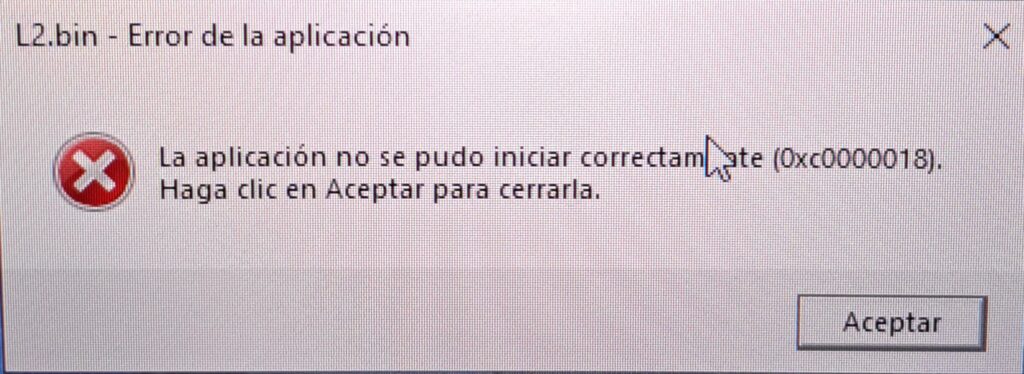
Due to the extensive modifications and optimizations made to both the game client and server core, some Lineage II client versions may have compatibility differences.
To provide the highest possible compatibility, we have implemented two separate BIN startup paths. In certain situations, the launcher may initially attempt to use a startup path that is not compatible with your specific client version, which can result in a BIN-related error message.
If this happens, there is no need to worry.
Simply close the error message. The launcher will automatically recognize that the selected startup path is not compatible with your installation, discard that option, and immediately relaunch the game using the alternative startup path. In most cases, the game will start correctly on the second attempt without any additional action required from the player.
This system was specifically designed to support different client versions and resolve compatibility issues automatically. At most, you may encounter this error once during the detection process.
Thank you for your patience, and welcome to L2 Rework! 🚀